AI Design: How AI Digital Tools Are Transforming Creativity
AI design uses artificial intelligence to create, improve, and automate visual and digital designs such as logos, websites, ads, and product mockups. Combined with AI digital tools, it helps teams work faster, cut costs, and test more ideas than manual workflows allow.
In this guide, you’ll learn what AI design is, how AI digital tools work, where to use them, and how to get started today.

Surveys cited in design industry reports show 86% of global creators use generative AI in their work, and 85% of designers and developers expect AI to be essential to their future success
Source: Idealogic.io
What Is AI Design?
AI design is the use of machine learning, especially generative models, to create or assist with visual and digital design. You describe what you want in text or upload a reference, and the tool produces layouts, images, color options, or interface screens that you then refine.
It covers four main areas:
- Graphic design: logos, posters, social posts, and brand assets
- UI/UX design: wireframes, app screens, and prototypes
- Web design: landing pages and page layouts
- Marketing creative: ad variations, email visuals, and campaign assets, often called AI digital marketing or AI digital design work
AI handles the repetitive production steps. People still decide strategy, taste, and quality.
Compare the Top AI Tools
Get our free AI design tools checklist. Compare Canva, Figma, Firefly, and Midjourney side by side, with clear, practical tips on pricing, licensing, and the best use for each tool.
Logo • Advertising • Business Cards • Website Design
Promote Your Brand →How Widely Is AI Design Used in 2027?
The numbers show a fast shift from experiment to daily habit:
- The AI in Design Report 2026, by Designer Fund and Foundation Capital, surveyed 906 designers in more than 60 countries in March 2026. It found weekly AI use rose from 54% in 2025 to 91% in 2026, and the average toolkit grew from three tools to seven.
- The same research found 62% of designers name inconsistent or unreliable output as their biggest challenge.
- Designlab’s 2026 survey of UX and product designers reports the share of designers not using AI at all has dropped to about 6%.
What this means for you: AI design is no longer a differentiator on its own. Judgment, brand knowledge, and quality control are what set good work apart.
How AI Design Works
Most tools use generative models trained on large collections of images, layouts, and text. They learn patterns in composition, color, spacing, and style, then produce new output from your prompt.
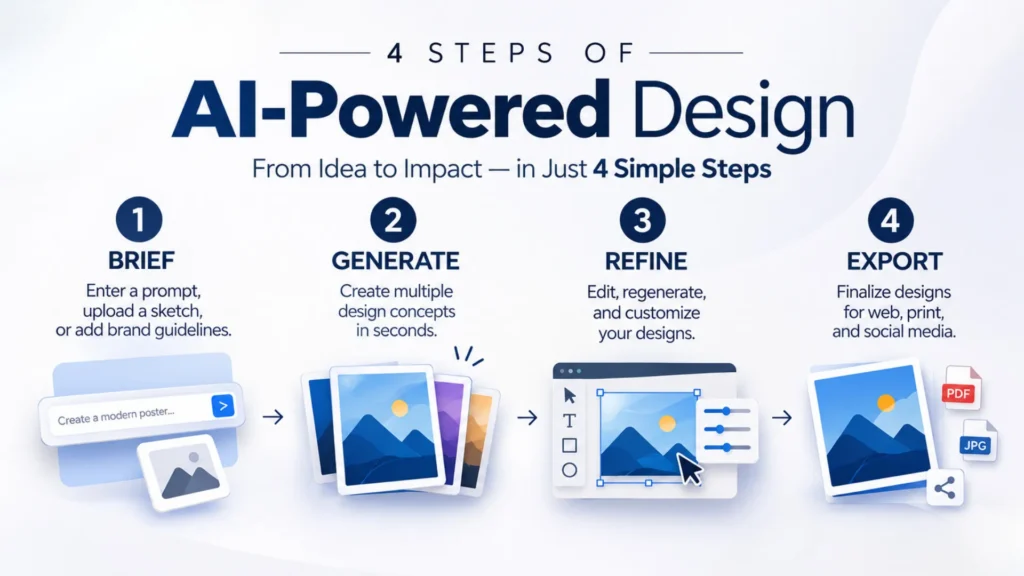
A typical workflow:
- Brief: write a prompt, upload a sketch, or load brand guidelines.
- Generate: the tool returns several options in seconds.
- Refine: regenerate, edit by hand, or combine elements.
- Export: finish in your usual software for web, print, or social.
Two tool categories matter when choosing:
- AI inside design platforms (Canva, Figma, Adobe) add generation to editors you already use, so output stays editable.
- Standalone generators (Midjourney) produce striking images, but you usually refine them elsewhere.
Best AI Design Tools Compared
Prices and credit limits change often, so check each vendor’s pricing page before buying.
| Tool | Best for | Main strength | Main limitation |
|---|---|---|---|
| Canva (Magic Studio) | Marketing content, non-designers | Prompt-to-layout, big template library, brand kits | Lower quality ceiling than dedicated creative tools |
| Figma AI | UI/UX and product teams | AI inside a collaborative design and prototyping workflow | Heavy AI features run on credits; complex design systems still need manual work |
| Adobe Firefly | Photo editing and pro creative work | Generative Fill and Expand inside Creative Cloud apps | Most value if you already use Adobe software |
| Midjourney | Concept art and visual exploration | Highly stylized image quality | Weaker brand control, so better for exploration than final production assets |

Canva (Magic Studio)
Canva suits teams that need many on-brand assets quickly. Its Magic Design feature generates complete layouts from a prompt, and Magic Edit adjusts individual elements. It’s a strong fit for social posts, presentations, and ads.
Figma AI
Figma suits product designers who want AI inside the tool where wireframes, components, and prototypes already live. Collaboration is its main edge for UI/UX work.
Adobe Firefly
Firefly’s Generative Fill and Generative Expand are widely praised for everyday photo and design editing. It’s included with Creative Cloud, which makes it the natural choice for existing Adobe users.
Midjourney
Midjourney is best used early, for moodboards, concepts, and visual direction. Figma’s own tool guide notes it favours aesthetic quality over brand control, so export results and refine them in a design editor.
AI image design tools rely on machine learning models (such as diffusion models) to convert text or reference inputs into visual assets, and they operate under strict technical, legal, and workflow realities
How to choose: match the tool to the job. Marketing teams usually start with Canva, product teams with Figma, Adobe users with Firefly, and anyone exploring visual ideas with Midjourney.
AI Design Use Cases
AI Graphic Design and Branding
Small businesses use AI to produce logos, social graphics, and brand kits without a full design team. Keep fonts, colors, and logo rules in a brand kit so every asset stays consistent.
AI UI/UX and Web Design
Designers use AI to turn a text brief into wireframes, screen variations, and landing page layouts. It speeds up early exploration, while usability decisions still need human testing.
AI Digital Marketing and Content
Marketing teams use AI digital marketing workflows to create ad variations, resize assets for each channel, and test several creative directions quickly. Designlab’s survey found 38.4% of designers now produce more design variations than before, which is exactly the kind of testing marketing teams rely on.
Can You Copyright and Sell AI-Generated Designs?
The rules depend on your country, so confirm with a qualified lawyer for important projects. In the United States, the Copyright Office’s January 2025 report concluded that AI outputs can be protected only where a human author determines enough of the expressive elements, and that prompts alone aren’t enough. The same report says using AI as an assistive tool doesn’t bar copyright in the finished work.
Practical takeaways:
- Don’t rely on raw, unedited AI output for assets you need to own exclusively, such as a logo.
- Add real human work: edit, combine, redraw, and arrange.
- Read each tool’s commercial-use terms before client work.
- Keep records of your prompts, edits, and licenses.
This is general information, not legal advice.
Your AI Design Partner
Looking for an AI design agency you can trust? We pair modern AI tools with senior designers, clear processes, and honest timelines. Tell us about your project to get started.
Wait! Grab Your Free Starter PackLimits and Risks of AI Design
- Inconsistent output: as noted above, 62% of designers cite unreliable output as their top challenge. Plan time for review and fixes.
- Generic results: vague prompts produce look-alike designs.
- Ownership gaps: see the copyright section above.
- Brand drift: without a brand kit, tools can stray from your style.
- Accessibility: check color contrast, text size, and alt text yourself, because AI doesn’t guarantee them.
- Privacy: don’t upload confidential client files to tools you haven’t vetted.
How to Start with AI Design: Step by Step
- Pick one job. Choose a concrete task, such as a social post set or a landing page draft.
- Choose one tool from the comparison table. Resist the urge to test seven at once.
- Gather brand inputs: logo, hex codes, fonts, tone notes, and 2 to 3 reference images.
- Write a specific prompt covering subject, style, mood, format, and audience.
- Generate 5 to 10 options and shortlist two.
- Refine by hand in your design editor and fix details, text, and spacing.
- Test and record. Compare performance with an A/B test and save prompts that worked.
Final Words
AI design is now a standard part of how teams create visuals, with 91% of surveyed designers using it weekly. Start with one tool and one real project, edit the results by hand, and respect licensing rules. Then expand your toolkit as you learn what works.
About the Author
This article was written by Sandeep Kumar Rajput, Digital Marketing Manager with expertise in SEO and performance marketing. Insights are based on Google Search Central guidelines and industry research.
Editorial note: This article is intended for educational and informational purposes. AI tool capabilities, platform features, and government guidelines may change over time. Readers should consult the official documentation linked in this article for the latest information.
Last updated: November 25, 2026.